Selasa, 30 Juni 2020

11 Hacking Websites & forums 2018 - Underground hacker sites

  • HackRead: HackRead is a News Platform that centers on InfoSec, Cyber Crime, Privacy, Surveillance, and Hacking News with full-scale reviews on Social Media Platforms.
  • KitPloit: Leading source of Security Tools, Hacking Tools, CyberSecurity and Network Security.
  • Metasploit: Find security issues, verify vulnerability mitigations & manage security assessments with Metasploit. Get the worlds best penetration testing software now.
  • Hacked Gadgets: A resource for DIY project documentation as well as general gadget and technology news.
  • The Hacker News: The Hacker News — most trusted and widely-acknowledged online cyber security news magazine with in-depth technical coverage for cybersecurity.
  • SecTools.Org: List of 75 security tools based on a 2003 vote by hackers.
  • Packet Storm: Information Security Services, News, Files, Tools, Exploits, Advisories and Whitepapers.
  • Phrack Magazine: Digital hacking magazine.
  • Exploit DB: An archive of exploits and vulnerable software by Offensive Security. The site collects exploits from submissions and mailing lists and concentrates them in a single database.
  • Hakin9: E-magazine offering in-depth looks at both attack and defense techniques and concentrates on difficult technical issues.
  • NFOHump: Offers up-to-date .NFO files and reviews on the latest pirate software releases.

Kamis, 11 Juni 2020

Top 10 Most Popular Ethical Hacking Tools (2019 Ranking)

     Top 10 powerful Hacking  Tools in 2019.       

If hacking is performed to identify the potential threats to a computer or network then it will be an ethical hacking.

Ethical hacking is also called penetration testing, intrusion testing, and red teaming.

Hacking is the process of gaining access to a computer system with the intention of fraud, data stealing, and privacy invasion etc., by identifying its weaknesses.

Ethical Hackers:

A person who performs the hacking activities is called a hacker.

There are six types of hackers:

  • The Ethical Hacker (White hat)
  • Cracker
  • Grey hat
  • Script kiddies
  • Hacktivist
  • Phreaker

A security professional who uses his/her hacking skills for defensive purposes is called an ethical hacker. To strengthen the security, ethical hackers use their skills to find vulnerabilities, document them, and suggest the ways to rectify them.

Companies that provide online services or those which are connected to the internet, must perform penetration testing by ethical hackers. Penetration testing is another name of ethical hacking. It can be performed manually or through an automation tool.

Ethical hackers work as an information security expert. They try to break the security of a computer system, network, or applications. They identify the weak points and based on that, they give advice or suggestions to strengthen the security.

Programming languages that are used for hacking include PHP, SQL, Python, Ruby, Bash, Perl, C, C++, Java, VBScript, Visual Basic, C Sharp, JavaScript, and HTML.

Few Hacking Certifications include:

  1. CEH
  2. GIAC
  3. OSCP
  4. CREST

Let's Explore!!

#1) Nmap

Nmap

Price: Free

Description:

Nmap is a security scanner, port scanner, as well as a network exploration tool. It is an open source software and is available for free.

It supports cross-platform. It can be used for network inventory, managing service upgrade schedules, and for monitoring host & service uptime. It can work for a single host as well as large networks. It provides binary packages for Linux, Windows, and Mac OS X.

Features: 

  • Nmap suite has:
    • Data transfer, redirection, and debugging tool(Ncat),
    • Scan results comparing utility(Ndiff),
    • Packet generation and response analysis tool (Nping),
    • GUI and Results viewer (Nping)
  • Using raw IP packets it can determine:
    • The available hosts on the network.
    • Their services offered by these available hosts.
    • Their OS.
    • Packet filters they are using.
    • And many other characteristics.

Best for: Nmap is best for scanning network. It is easy to use and fast as well.

Website: Nmap

******************

#2) Netsparker

Netsparker Vulnerability-Assessments-and-Penetration-Tests

Netsparker is a dead accurate ethical hacking tool, that mimics a hacker's moves to identify vulnerabilities such as SQL Injection and Cross-site Scripting in web applications and web APIs. 
 
Netsparker uniquely verifies the identified vulnerabilities proving they are real and not false positives, so you do not need to waste hours manually verifying the identified vulnerabilities once a scan is finished.
 
It is available as a Windows software and an online service.

******************

#3) Acunetix 

Acunetix Dashboard

Acunetix is a fully automated ethical hacking tool that detects and reports on over 4500 web application vulnerabilities including all variants of SQL Injection and XSS.

The Acunetix crawler fully supports HTML5 and JavaScript and Single-page applications, allowing auditing of complex, authenticated applications.

It bakes in advanced Vulnerability Management features right-into its core, prioritizing risks based on data through a single, consolidated view, and integrating the scanner's results into other tools and platforms.

=> Visit Acunetix Official Website

******************

#4) Metasploit

Metasploit

Price: Metasploit Framework is an open source tool and it can be downloaded for free. Metasploit Pro is a commercial product. Its free trial is available for 14 days. Contact the company to know more about its pricing details.

Description:


It is the software for penetration testing. Using Metasploit Framework, you can develop and execute exploit code against a remote machine. It supports cross-platform.

Features: 

  • It is useful for knowing about security vulnerabilities.
  • Helps in penetration testing.
  • Helps in IDS signature development.
  • You can create security testing tools.

Best For Building anti-forensic and evasion tools.

Website: Metasploit

#5) Aircrack-Ng

aircrack-ng

Price: Free

Description:

Aircrack-ng provides different tools for evaluating Wi-Fi network security.

All are command line tools. For Wi-Fi security, it focuses on monitoring, attacking, testing, and cracking. It supports Linux, Windows, OS X, Free BSD, NetBSD, OpenBSD, Solaris, and eComStation 2.

Features:


  • Aircrack-ng can focus on Replay attacks, de-authentication, fake access points, and others.
  • It supports exporting data to text files.
  • It can check Wi-Fi cards and driver capabilities.
  • It can crack WEP keys and for that, it makes use of FMS attack, PTW attack, and dictionary attacks.
  • It can crack WPA2-PSK and for that, it makes use of dictionary attacks.

Best For: Supports any wireless network interface controller.

Website: Aircrack-Ng

#6) Wireshark

Wireshark

Price: Free

Description:

Wireshark is a packet analyzer and can perform deep inspection of many protocols.

It supports cross-platform. It allows you to export the output to different file formats like XML, PostScript, CSV, and Plaintext. It provides the facility to apply coloring rules to packet list so that analysis will be easier and quicker. The above image will show the capturing of packets.

Features:

  • It can decompress the gzip files on the fly.
  • It can decrypt many protocols like IPsec, ISAKMP, and SSL/TLS etc.
  • It can perform live capture and offline analysis.
  • It allows you to browse the captured network data using GUI or TTY-mode TShark utility.

Best For: Analyzing data packets.

Website: Wireshark

#7) Ettercap

Ettercap

Price: Free.

Description:

Ettercap supports cross-platform. Using Ettercap's API, you can create custom plugins. Even with the proxy connection, it can do sniffing of HTTP SSL secured data.

Features:

  • Sniffing of live connections.
  • Content filtering.
  • Active and passive dissection of many protocols.
  • Network and host analysis.

Best For: It allows you to create custom plugins.

Website: Ettercap

#8) Maltego

Maltego

Price: The Community version, Maltego CE is available for free. Price for Maltego Classic is $999. Price for Maltego XL is $1999. These two products are for the desktop. Price for the server products like CTAS, ITDS, and Comms starts at $40000, which includes training as well.

Description:

Maltego is a tool for link analysis and data mining. It supports Windows, Linux, and Mac OS.

For the discovery of data from open sources and visualizing the information in graphical format, it provides the library of transforms. It performs real-time data-mining and information gathering.

Features:

  • Represents the data on node-based graph patterns.
  • Maltego XL can work with large graphs.
  • It will provide you the graphical picture, thereby telling you about the weak points and abnormalities of the network.

Best For: It can work with very large graphs.

Website: Maltego

#9) Nikto

Nikto

Price: Free

Description:

Nikto is an open source tool for scanning the web server.

It scans the web server for dangerous files, outdated versions, and particular version related problems. It saves the report in a text file, XML, HTML, NBE, and CSV file formats. Nikto can be used on the system which supports basic Perl installation. It can be used on Windows, Mac, Linux, and UNIX systems.

Features:

  • It can check web servers for over 6700 potentially dangerous files.
  • It has full HTTP proxy support.
  • Using Headers, favicons, and files, it can identify the installed software.
  • It can scan the server for outdated server components.

Best For: As a Penetration Testing tool.

Website: Nikto

#10) Burp Suite

BurpSuite

Price: It has three pricing plans. Community edition can be downloaded for free. Pricing for Enterprise edition starts at $3999 per year. Price of the Professional edition starts at $399 per user per year.

Description:

Burp Suite has a web vulnerability scanner and has advanced and essential manual tools.

It provides many features for web application security. It has three editions, community, enterprise, and professional. With community editions, it provides essential manual tools. With the paid versions it provides more features like Web vulnerabilities scanner.

Features:

  • It allows you to schedule and repeats the scan.
  • It scans for 100 generic vulnerabilities.
  • It uses out-of-band techniques (OAST).
  • It provides detailed custom advisory for the reported vulnerabilities.
  • It provides CI Integration.

Best For: Security testing.

Website: Burp Suite

#11) John The Ripper

John-the-Ripper

Price: Free

Description:

John the Ripper is a tool for password cracking. It can be used on Windows, DOS, and Open VMS. It is an open source tool. It is created for detecting weak UNIX passwords.

Features:

  • John the Ripper can be used to test various encrypted passwords.
  • It performs dictionary attacks.
  • It provides various password crackers in one package.
  • It provides a customizable cracker.

Best For: It is fast in password cracking.

Website:  John the Ripper

#12) Angry IP Scanner

AngryIPScanner

Price: Free

Description:

Angry IP Scanner is a tool for scanning the IP addresses and ports. It can scan both on local network and Internet. It supports Windows, Mac, and Linux operating systems.

Features:

  • It can export the result in many formats.
  • It is a command-line interface tool.
  • It is extensible with many data fetchers.

Website:  Angry IP Scanner

Conclusion

As explained here, Nmap is used for computer security and network management. It is good for scanning the network. Metasploit is also for security and is good for building anti-forensic and evasion tools.

Aircrack-Ng is a free packet sniffer & injector and supports cross-platform. Wireshark is a packet analyzer and is good in analyzing data packets. As per the reviews available online, people recommend using Nmap instead of Angry IP scanner as Angry IP Scanner comes with unwanted applications.

John the Ripper is fast in password cracking. Nikto is a good open source tool for penetration testing. Maltego presents the data in a graphical form and will give you information about weak points and abnormalities.

This was all about the ethical hacking and the top ethical hacking tools. Hope you will find this article to be much useful!!

@EVERYTHING NT

Read more

Probing For XML Encryption Weaknesses In SAML With EsPReSSO

Security Assertion Markup Language (SAML) is an XML-based standard commonly used in Web Single Sign-On (SSO) [1]. In SAML, the confidentiality of transferred authentication statements against intermediaries can be provided using XML Encryption [2]. However, implementing XML Encryption in a secure way can be tricky and several attacks on XML Encryption have been identified in the past [3] [4]. Therefore, when auditing a SAML endpoint, one should always consider testing for vulnerabilities in the XML Encryption implementation.

This blog post introduces our latest addition to the SAML Attacker of our BurpSuite extension EsPReSSO: the Encryption Attack tab. The new tab allows for easy manipulation of the encrypted parts within intercepted SAML responses and can, therefore, be used to quickly assess whether the SAML endpoint is vulnerable against certain XML Encryption attacks.


Weaknesses of XML Encryption

Implementations of XML Encryption can be vulnerable to adaptive chosen ciphertext attacks. This is a class of attacks in which the attacker sends a sequence of manipulated ciphertexts to a decryption oracle as a way to gain information about the plaintext content.
Falsely implemented XML Encryption can be broken using:
  • an attack against the CBC-mode decryption (quite similar to a padding oracle attack) [3] or
  • a Bleichenbacher attack against the RSA-PKCS#1 encryption of the session key  [4].
SAML makes use of XML Encryption and its implementations could, therefore, also be vulnerable to these attacks.

XML Encryption in SAML

To support confidential transmission of sensitive data within the SAML Assertion, assertions can be encrypted using XML Encryption. An EncryptedAssertion is shown in the abridged example below.

<EncryptedAssertion>
  <EncryptedData>
    <EncryptionMethod Algorithm="http://www.w3.org/2001/04/xmlenc#aes128-cbc"/>
    <KeyInfo>
      <EncryptedKey>
        <EncryptionMethod Algorithm="http://www.w3.org/2001/04/xmlenc#rsa-1_5"/>
        <CipherData>
          <CipherValue>
            [...]
          </CipherValue>
        </CipherData>
      </EncryptedKey>
    </KeyInfo>
    <CipherData>
        <CipherValue>
          [...]
        </CipherValue>
    </CipherData>
  </EncryptedData>
</EncryptedAssertion>

The EncryptedAssertion contains an EncryptedData element, which in turn is the parent of the EncryptionMethod, KeyInfo, and CipherData elements.  SAML makes use of what is referred to as a hybrid encryption scheme. This is done using a session key which symmetrically encrypts the payload data (the example uses AES-128 in CBC mode), resulting in the ciphertext contained in the EncryptedAssertion/EncryptedData/CipherData/CipherValue child element. The session key itself is encrypted using an asymmetric encryption scheme. In our example, RSA-PKCS#1.5 encryption is used with the public key of the recipient, allowing the contents of the the EncryptedKey child element to be derived from the KeyInfo element. 

Encryption Attacker

Our BurpSuite extension EsPReSSO can help detect vulnerable implementations with the newly integrated Encryption Attacker within EsPReSSO's SAML module.

Once a SAML response which contains an EncryptedAssertion has been intercepted, open the SAML tab, select the Attacks pane, and choose Encryption from the dropdown menu. This works in Burp's Proxy, as well as in the Repeater tool, and is depicted below.
As sketched out above, the symmetric session key is encrypted using the recipient's public key. Since the key is public, anybody can use it to encrypt a selected symmetric key and submit a valid encryption of arbitrary messages to the recipient. This is incredibly helpful because it allows us to produce ciphertexts that decrypt the chosen plaintexts. To accomplish this, one can purposefully send invalidly padded messages, or messages containing invalid XML, as a method to trigger and analyze the different reactions of the decryption endpoint (i.e, turning the endpoint into a decryption oracle). To facilitate these investigations, the new Encryption Attacker makes this process dead simple.
The screenshot above shows the essential interface of the new encryption tab:
At the top, the certificate used to encrypt the symmetric session key can be pasted into the text field. This field will be pre-filled automatically if the intercepted SAML message includes a certificate in the KeyInfo child element of the EncryptedData element. The Update Certificate checkboxes above the text area can be used to include the certificate in the manipulated SAML message.
In the Symmetric Key text field, the hexadecimal value of the symmetric session key can be set. Choose the asymmetric algorithm from the dropdown menu and click Encrypt key -- this will update the corresponding KeyInfo elements of the intercepted SAML message. 

The payload in the text area labeled XML data can now be entered. Any update in the XML data field will also be reflected in the hexadecimal representation of the payload (found on right of the XML data field). Note that this is automatically padded to the blocklength required by the symmetric algorithm selected below. However, the payload and the padding can be manually adjusted in the hex editor field.

Eventually, click the Encrypt content button to generate the encrypted payload. This will apply the changes to the intercepted SAML message, and the manipulated message using Burp's Forward or Go button can now be forwarded, as usual.

Probing for Bleichenbacher Oracles

Bleichenbacher's attack against RSA-PKCS1 v1.5 encryption abuses the malleability of RSA to draw conclusions about the plaintext by multiplying the ciphertext with adaptively chosen values, and observing differences in the received responses. If the (error-) responses differ for valid and invalid PKCS1 v1.5 ciphertexts, Bleichenbachers' algorithm can be used to decrypt the ciphertext without knowing the private key [6].

To determine whether or not a SAML endpoint is vulnerable to Bleichenbacher's Attack, we simply need to check if we can distinguish those responses received when submitting ciphertexts that are decrypted into invalidly formatted PKCS1 v1.5 plaintexts, from the responses we receive when sending ciphertexts that are decrypted into validly formatted plaintexts. 

Recall that PKCS1 v1.5 mandates a certain format of the encrypted plaintext, namely a concatenation of a BlockType 00 02, a randomized PaddingString (PS) that includes no 00 bytes, a 00 (NULL-byte) as delimiter, and the actual plaintext message. The whole sequence should be equal in size to the modulus of the RSA key used. That is, given the byte length k of the RSA modulus and the message length |m|, PS has the length |PS| = k - 3 - |m|. Furthermore, PKCS1 v1.5 demands that |PS| to be at least eight bytes long [5]. 

In SAML, the recipient's public key is usually known because it is published in the metadata, or even included in the EncryptedAssertion. For this reason, we do not need to fiddle around with manipulated ciphertexts. Instead, we simply submit a validly formatted RSA-PKCS1 v1.5 encrypted message and an encrypted message which deciphers into an invalidly formatted plaintext. As an example, assume an RSA public key of 2048 bits which we want to use to encrypt a 16 byte session key `01 02 03 04 05 06 07 08 09 0A 0B 0C 0D 0E 0F 10` (hexadecimal representation). |PS|$ is $2048/8 - 3 - 16 = 237, so a valid PKCS1 v1.5 plaintext, ready to be encrypted using `AA` for all 237 padding bytes, could look like the listing shown below.

00 02 AA AA AA AA AA AA AA AA AA AA AA AA AA AA
AA AA AA AA AA AA AA AA AA AA AA AA AA AA AA AA
AA AA AA AA AA AA AA AA AA AA AA AA AA AA AA 00
01 02 03 04 05 06 07 08 09 0A 0B 0C 0D 0E 0F 10
In the Encryption attack pane of EsPReSSO, ensure that the correct public key certificate has been added to the Certificate field. Insert a valid plaintext, such as the one above, into the Symmetric Key field and select Plain RSA encryption from the Algorithm drop down menu. Click the Encrypt button to compute the RSA transformation and apply the new EncryptedKey element to the intercepted SAML message. Now, submit the message by clicking Burp's Go or Forward button and carefully inspect the response.

Next, repeat the steps outlined above, but this time submit an invalid PKCS1 v1.5 message. For example, consider using an invalid BlockType of `12 34` instead of `00 02`, or replace the `00` delimiter so that the decryptor is unable to determine the actual message after decrypting the ciphertext. If you are able to determine from the recieved responses whether or not the submitted ciphertext decrypted into a valid PKCS1 v1.5 formatted plaintext, chances are high that the decryptor can be used as a Bleichenbacher oracle. Don't forget to take into account the actual XML data, i.e., the assertion encrypted with the new session key; by submitting valid or invalid XML, or by removing signatures from the SAML message or the assertion you may increase your chances of detecting differences in the returned responses.

Probing for Oracles in CBC-Mode Decryption

Another known attack on XML Encryption is aimed at the Cipher Block Chaining (CBC) mode, which can be used with the block ciphers AES or 3DES [2]. The attack is described in detail in this referenced paper [3] and is quite similar to Padding-Oracle attacks on CBC mode; the malleability of CBC mode encryption enables the attacker to perform a bytewise, adaptive manipulation of the ciphertext blocks which are subsequently sent to the decryptor. In most cases, the manipulated ciphertext will not decrypt to valid XML and an error will be returned. Sometimes, however, the plaintext will be parsed as valid XML, in which cases an error is thrown later on at the application layer. The attacker observes the differences in the responses in order to turn the decryptor into a ciphertext validity oracle which can be used to break the encryption.  Due to some particularities of the XML format, this attack can be very efficient, enabling decryption with about 14 requests per byte, and it is even possible to fully automate the process [7].

In order to determine if a particular SAML service provider is vulnerable to this attack, we can avoid the cumbersome ciphertext manipulation, if we are in possession of the decryptor's public key:
In the Encryption Attacker tab of EsPReSSO, add the public key certificate to the Certificate field (if necessary) and insert a symmetric key of your own devising into the  Symmetric Key text field. Select an appropriate RSA encryption method and click the Encrypt button to apply the new EncryptedKey element to the original SAML message. 

An XML message can now be inserted into the XML data text field. Select a CBC mode encryption algorithm and click Encrypt to apply the changes. As in the example above, press Burp's Go or Forward button to send the message and carefully inspect the response. Try sending invalid XML, e.g., by not closing a tag or using the `&` character without a valid entity and keep an eye open for differences in the returned responses. To manipulate the padding, the text field on the right side shows the hexadecimal representation of the plaintext, including the CBC padding. If you send a single block and set the last byte, which indicates the padding length to the blocksize, i.e. 16 or 0x10 for AES, the ciphertext should decrypt into an empty string and is generally considered "valid" XML.

Please refer to the original paper for more details, tips, and tricks for performing the actual attack [3]. 

Summary

The new XML Encryption attacker included in EsPReSSO can help security auditors to quickly assess if a SAML endpoint is vulnerable to known attacks against XML Encryption. To this end, the decryptor's public key is used in order to send suitable test vectors that can be provided in plaintext. Ciphertext manipulation is, therefore, not required. The actual process of decrypting an intercepted SAML message is, however, considered out of scope and not implemented in EsPReSSO.

In case you wonder how XML Encryption can be used in a secure fashion, here are some considerations [6]:
  • Always use an authenticated encryption mode such as AES-GCM instead of the CBC-mode encryption.
  • Using RSA-PKCS1 v1.5 within XML Encryption is particularly difficult to do in a secure manner, and it is recommended to use RSA with Optimal Asymmetric Encryption Padding (OAEP) instead [2].
  • Apply a digital signature over the whole SAML response, and ensure it is properly validated before attempting to decrypt the assertion. This should thwart the attack as a manipulated response can be recognized as such and should be rejected.
----------
Related links
  1. Pentest Gear
  2. Pentest Wiki
  3. Hacking Device
  4. Pentest With Kali Linux
  5. Pentest Nmap
  6. Hacking Link
  7. Hacking Vpn
  8. Pentest Vpn

Probing For XML Encryption Weaknesses In SAML With EsPReSSO

Security Assertion Markup Language (SAML) is an XML-based standard commonly used in Web Single Sign-On (SSO) [1]. In SAML, the confidentiality of transferred authentication statements against intermediaries can be provided using XML Encryption [2]. However, implementing XML Encryption in a secure way can be tricky and several attacks on XML Encryption have been identified in the past [3] [4]. Therefore, when auditing a SAML endpoint, one should always consider testing for vulnerabilities in the XML Encryption implementation.

This blog post introduces our latest addition to the SAML Attacker of our BurpSuite extension EsPReSSO: the Encryption Attack tab. The new tab allows for easy manipulation of the encrypted parts within intercepted SAML responses and can, therefore, be used to quickly assess whether the SAML endpoint is vulnerable against certain XML Encryption attacks.


Weaknesses of XML Encryption

Implementations of XML Encryption can be vulnerable to adaptive chosen ciphertext attacks. This is a class of attacks in which the attacker sends a sequence of manipulated ciphertexts to a decryption oracle as a way to gain information about the plaintext content.
Falsely implemented XML Encryption can be broken using:
  • an attack against the CBC-mode decryption (quite similar to a padding oracle attack) [3] or
  • a Bleichenbacher attack against the RSA-PKCS#1 encryption of the session key  [4].
SAML makes use of XML Encryption and its implementations could, therefore, also be vulnerable to these attacks.

XML Encryption in SAML

To support confidential transmission of sensitive data within the SAML Assertion, assertions can be encrypted using XML Encryption. An EncryptedAssertion is shown in the abridged example below.

<EncryptedAssertion>
  <EncryptedData>
    <EncryptionMethod Algorithm="http://www.w3.org/2001/04/xmlenc#aes128-cbc"/>
    <KeyInfo>
      <EncryptedKey>
        <EncryptionMethod Algorithm="http://www.w3.org/2001/04/xmlenc#rsa-1_5"/>
        <CipherData>
          <CipherValue>
            [...]
          </CipherValue>
        </CipherData>
      </EncryptedKey>
    </KeyInfo>
    <CipherData>
        <CipherValue>
          [...]
        </CipherValue>
    </CipherData>
  </EncryptedData>
</EncryptedAssertion>

The EncryptedAssertion contains an EncryptedData element, which in turn is the parent of the EncryptionMethod, KeyInfo, and CipherData elements.  SAML makes use of what is referred to as a hybrid encryption scheme. This is done using a session key which symmetrically encrypts the payload data (the example uses AES-128 in CBC mode), resulting in the ciphertext contained in the EncryptedAssertion/EncryptedData/CipherData/CipherValue child element. The session key itself is encrypted using an asymmetric encryption scheme. In our example, RSA-PKCS#1.5 encryption is used with the public key of the recipient, allowing the contents of the the EncryptedKey child element to be derived from the KeyInfo element. 

Encryption Attacker

Our BurpSuite extension EsPReSSO can help detect vulnerable implementations with the newly integrated Encryption Attacker within EsPReSSO's SAML module.

Once a SAML response which contains an EncryptedAssertion has been intercepted, open the SAML tab, select the Attacks pane, and choose Encryption from the dropdown menu. This works in Burp's Proxy, as well as in the Repeater tool, and is depicted below.
As sketched out above, the symmetric session key is encrypted using the recipient's public key. Since the key is public, anybody can use it to encrypt a selected symmetric key and submit a valid encryption of arbitrary messages to the recipient. This is incredibly helpful because it allows us to produce ciphertexts that decrypt the chosen plaintexts. To accomplish this, one can purposefully send invalidly padded messages, or messages containing invalid XML, as a method to trigger and analyze the different reactions of the decryption endpoint (i.e, turning the endpoint into a decryption oracle). To facilitate these investigations, the new Encryption Attacker makes this process dead simple.
The screenshot above shows the essential interface of the new encryption tab:
At the top, the certificate used to encrypt the symmetric session key can be pasted into the text field. This field will be pre-filled automatically if the intercepted SAML message includes a certificate in the KeyInfo child element of the EncryptedData element. The Update Certificate checkboxes above the text area can be used to include the certificate in the manipulated SAML message.
In the Symmetric Key text field, the hexadecimal value of the symmetric session key can be set. Choose the asymmetric algorithm from the dropdown menu and click Encrypt key -- this will update the corresponding KeyInfo elements of the intercepted SAML message. 

The payload in the text area labeled XML data can now be entered. Any update in the XML data field will also be reflected in the hexadecimal representation of the payload (found on right of the XML data field). Note that this is automatically padded to the blocklength required by the symmetric algorithm selected below. However, the payload and the padding can be manually adjusted in the hex editor field.

Eventually, click the Encrypt content button to generate the encrypted payload. This will apply the changes to the intercepted SAML message, and the manipulated message using Burp's Forward or Go button can now be forwarded, as usual.

Probing for Bleichenbacher Oracles

Bleichenbacher's attack against RSA-PKCS1 v1.5 encryption abuses the malleability of RSA to draw conclusions about the plaintext by multiplying the ciphertext with adaptively chosen values, and observing differences in the received responses. If the (error-) responses differ for valid and invalid PKCS1 v1.5 ciphertexts, Bleichenbachers' algorithm can be used to decrypt the ciphertext without knowing the private key [6].

To determine whether or not a SAML endpoint is vulnerable to Bleichenbacher's Attack, we simply need to check if we can distinguish those responses received when submitting ciphertexts that are decrypted into invalidly formatted PKCS1 v1.5 plaintexts, from the responses we receive when sending ciphertexts that are decrypted into validly formatted plaintexts. 

Recall that PKCS1 v1.5 mandates a certain format of the encrypted plaintext, namely a concatenation of a BlockType 00 02, a randomized PaddingString (PS) that includes no 00 bytes, a 00 (NULL-byte) as delimiter, and the actual plaintext message. The whole sequence should be equal in size to the modulus of the RSA key used. That is, given the byte length k of the RSA modulus and the message length |m|, PS has the length |PS| = k - 3 - |m|. Furthermore, PKCS1 v1.5 demands that |PS| to be at least eight bytes long [5]. 

In SAML, the recipient's public key is usually known because it is published in the metadata, or even included in the EncryptedAssertion. For this reason, we do not need to fiddle around with manipulated ciphertexts. Instead, we simply submit a validly formatted RSA-PKCS1 v1.5 encrypted message and an encrypted message which deciphers into an invalidly formatted plaintext. As an example, assume an RSA public key of 2048 bits which we want to use to encrypt a 16 byte session key `01 02 03 04 05 06 07 08 09 0A 0B 0C 0D 0E 0F 10` (hexadecimal representation). |PS|$ is $2048/8 - 3 - 16 = 237, so a valid PKCS1 v1.5 plaintext, ready to be encrypted using `AA` for all 237 padding bytes, could look like the listing shown below.

00 02 AA AA AA AA AA AA AA AA AA AA AA AA AA AA
AA AA AA AA AA AA AA AA AA AA AA AA AA AA AA AA
AA AA AA AA AA AA AA AA AA AA AA AA AA AA AA 00
01 02 03 04 05 06 07 08 09 0A 0B 0C 0D 0E 0F 10
In the Encryption attack pane of EsPReSSO, ensure that the correct public key certificate has been added to the Certificate field. Insert a valid plaintext, such as the one above, into the Symmetric Key field and select Plain RSA encryption from the Algorithm drop down menu. Click the Encrypt button to compute the RSA transformation and apply the new EncryptedKey element to the intercepted SAML message. Now, submit the message by clicking Burp's Go or Forward button and carefully inspect the response.

Next, repeat the steps outlined above, but this time submit an invalid PKCS1 v1.5 message. For example, consider using an invalid BlockType of `12 34` instead of `00 02`, or replace the `00` delimiter so that the decryptor is unable to determine the actual message after decrypting the ciphertext. If you are able to determine from the recieved responses whether or not the submitted ciphertext decrypted into a valid PKCS1 v1.5 formatted plaintext, chances are high that the decryptor can be used as a Bleichenbacher oracle. Don't forget to take into account the actual XML data, i.e., the assertion encrypted with the new session key; by submitting valid or invalid XML, or by removing signatures from the SAML message or the assertion you may increase your chances of detecting differences in the returned responses.

Probing for Oracles in CBC-Mode Decryption

Another known attack on XML Encryption is aimed at the Cipher Block Chaining (CBC) mode, which can be used with the block ciphers AES or 3DES [2]. The attack is described in detail in this referenced paper [3] and is quite similar to Padding-Oracle attacks on CBC mode; the malleability of CBC mode encryption enables the attacker to perform a bytewise, adaptive manipulation of the ciphertext blocks which are subsequently sent to the decryptor. In most cases, the manipulated ciphertext will not decrypt to valid XML and an error will be returned. Sometimes, however, the plaintext will be parsed as valid XML, in which cases an error is thrown later on at the application layer. The attacker observes the differences in the responses in order to turn the decryptor into a ciphertext validity oracle which can be used to break the encryption.  Due to some particularities of the XML format, this attack can be very efficient, enabling decryption with about 14 requests per byte, and it is even possible to fully automate the process [7].

In order to determine if a particular SAML service provider is vulnerable to this attack, we can avoid the cumbersome ciphertext manipulation, if we are in possession of the decryptor's public key:
In the Encryption Attacker tab of EsPReSSO, add the public key certificate to the Certificate field (if necessary) and insert a symmetric key of your own devising into the  Symmetric Key text field. Select an appropriate RSA encryption method and click the Encrypt button to apply the new EncryptedKey element to the original SAML message. 

An XML message can now be inserted into the XML data text field. Select a CBC mode encryption algorithm and click Encrypt to apply the changes. As in the example above, press Burp's Go or Forward button to send the message and carefully inspect the response. Try sending invalid XML, e.g., by not closing a tag or using the `&` character without a valid entity and keep an eye open for differences in the returned responses. To manipulate the padding, the text field on the right side shows the hexadecimal representation of the plaintext, including the CBC padding. If you send a single block and set the last byte, which indicates the padding length to the blocksize, i.e. 16 or 0x10 for AES, the ciphertext should decrypt into an empty string and is generally considered "valid" XML.

Please refer to the original paper for more details, tips, and tricks for performing the actual attack [3]. 

Summary

The new XML Encryption attacker included in EsPReSSO can help security auditors to quickly assess if a SAML endpoint is vulnerable to known attacks against XML Encryption. To this end, the decryptor's public key is used in order to send suitable test vectors that can be provided in plaintext. Ciphertext manipulation is, therefore, not required. The actual process of decrypting an intercepted SAML message is, however, considered out of scope and not implemented in EsPReSSO.

In case you wonder how XML Encryption can be used in a secure fashion, here are some considerations [6]:
  • Always use an authenticated encryption mode such as AES-GCM instead of the CBC-mode encryption.
  • Using RSA-PKCS1 v1.5 within XML Encryption is particularly difficult to do in a secure manner, and it is recommended to use RSA with Optimal Asymmetric Encryption Padding (OAEP) instead [2].
  • Apply a digital signature over the whole SAML response, and ensure it is properly validated before attempting to decrypt the assertion. This should thwart the attack as a manipulated response can be recognized as such and should be rejected.
----------
Related news

How To Start | How To Become An Ethical Hacker

Are you tired of reading endless news stories about ethical hacking and not really knowing what that means? Let's change that!
This Post is for the people that:

  • Have No Experience With Cybersecurity (Ethical Hacking)
  • Have Limited Experience.
  • Those That Just Can't Get A Break


OK, let's dive into the post and suggest some ways that you can get ahead in Cybersecurity.
I receive many messages on how to become a hacker. "I'm a beginner in hacking, how should I start?" or "I want to be able to hack my friend's Facebook account" are some of the more frequent queries. Hacking is a skill. And you must remember that if you want to learn hacking solely for the fun of hacking into your friend's Facebook account or email, things will not work out for you. You should decide to learn hacking because of your fascination for technology and your desire to be an expert in computer systems. Its time to change the color of your hat 😀

 I've had my good share of Hats. Black, white or sometimes a blackish shade of grey. The darker it gets, the more fun you have.

If you have no experience don't worry. We ALL had to start somewhere, and we ALL needed help to get where we are today. No one is an island and no one is born with all the necessary skills. Period.OK, so you have zero experience and limited skills…my advice in this instance is that you teach yourself some absolute fundamentals.
Let's get this party started.
  •  What is hacking?
Hacking is identifying weakness and vulnerabilities of some system and gaining access with it.
Hacker gets unauthorized access by targeting system while ethical hacker have an official permission in a lawful and legitimate manner to assess the security posture of a target system(s)

 There's some types of hackers, a bit of "terminology".
White hat — ethical hacker.
Black hat — classical hacker, get unauthorized access.
Grey hat — person who gets unauthorized access but reveals the weaknesses to the company.
Script kiddie — person with no technical skills just used pre-made tools.
Hacktivist — person who hacks for some idea and leaves some messages. For example strike against copyright.
  •  Skills required to become ethical hacker.
  1. Curosity anf exploration
  2. Operating System
  3. Fundamentals of Networking
*Note this sites


Related posts


  1. Pentest With Kali Linux
  2. Hacker Attack
  3. Hacking Games Online
  4. Hacking Games
  5. Pentest With Kali
  6. Pentest Active Directory
  7. Hacker Google
  8. Pentestbox
  9. Pentest Tutorial

Social Engineering Pentest Professional(SEPP) Training Review

Intro:
I recently returned from the new Social Engineering training provided by Social-Engineer.org in the beautiful city of Seattle,WA, a state known for sparkly vampires, music and coffee shop culture.  As many of you reading this article, i also read the authors definitive book Social Engineering- The art of human hacking and routinely perform SE engagements for my clients. When i heard that the author of the aforementioned book was providing training i immediately signed up to get an in person glance at the content provided in the book. However, i was pleasantly surprised to find the course covered so much more then what was presented in the book.

Instructors:


I wasn't aware that there would be more then one instructor and was extremely happy with the content provided by both instructors. Chris and Robin both have a vast amount of knowledge and experience in the realm of social engineering.  Each instructor brought a different angle and use case scenario to the course content. Robin is an FBI agent in charge of behavioral analysis and uses social engineering in his daily life and work to get the results needed to keep our country safe. Chris uses social engineering in his daily work to help keep his clients secure and provides all sorts of free learning material to the information security community through podcasts and online frameworks.


Course Material and Expectation: 
I originally thought that the material covered in class would be a live reiteration of the material covered in Chris's book. However, I couldn't have been more wrong !!  The whole first day was about reading yourself and other people, much of the material was what Robin uses to train FBI agents in eliciting information from possible terrorist threats. Each learning module was based on live demo's, nightly labs, and constant classroom interaction. Each module was in depth and the level of interaction between students was extremely useful and friendly. I would say the instructors had as much fun as the students learning and sharing social techniques and war stories.
The class was heavily made up of ways to elicit personal and confidential information in a way that left the individuatial "Happier for having met you".  Using language, body posture and social truisms as your weapon to gather information, not intended for your ears, but happily leaving the tongue of your target.
Other class activities and materials included an in depth look at micro expressions with labs and free extended learning material going beyond the allotted classroom days.  Also break out sessions which focused on creating Phone and Phishing scripts to effectively raise your rate of success. These sessions were invaluable at learning to use proper language techniques on the phone and in email to obtain your objectives.

Nightly Missions/Labs: 
If you think that you are going to relax at night with a beer. Think again!! You must ensure that your nights are free, as you will be going on missions to gain information from live targets at venues of your choice.  Each night you will have a partner and a mission to gain certain information while making that persons day better then it started.  The information  you are requested to obtain will change each night and if done properly you will notice all of the material in class starting to unfold.. When you get to body language training you will notice which targets are open and when its best to go in for the kill. You will see interactions change based on a persons change in posture and facial expressions. Each day you will take the new techniques you have learned and put them into practice. Each morning you have to report your findings to the class..
During my nightly labs i obtained information such as door codes to secured research facilities, information regarding secret yet to be released projects.  On the lighter side of things i obtained much personal information from my targets along with phone numbers and invitations for further hangouts and events. I made many new friends inside and outside of class.
There were also labs within the confines of the classroom such as games used to solidify your knowledge and tests to figure out what kind of learner you are. Technical labs on the use of information gathering tools and ways to use phone and phishing techniques to your advantage via linguistically and technologically. Essentially the class was about 60% interaction and labs.


Proof it works:
After class i immediately had a phishing and phone based contract at my current employment. I used the email and phone scripts that we created in class with 100% click rate and 100% success in phone elicitation techniques. Gaining full unfettered access to networks through phone and email elicitation and interaction. Although I do generally have a decent SE success rate, my rates on return are now much higher and an understanding of what works and what doesn't, and why are much more refined.


Conclusion and Certification:
I paid for this class out of pocket, including all expenses, hotels, rentals cars and planes etc etc. I would say that the class was worth every penny in which i paid for it. Many extras were given including black hat passes, extended training from notable sources and continued interaction from instructors after class ended. I would highly recommend this class to anyone looking for a solid foundation in social engineering or a non technical alternative to training.  You will learn a lot, push yourself in new ways and have a blast doing it. However I did not see any sparkly vampires while in seattle.... Twilight lied to me LOL
The certification is a 48 hour test in which you will utilize your knowledge gained technologically and socially to breach a company.I am not going to give away to much information about the certification as i haven't taken it yet and I do not want to misspeak on the subject. However I will say that social-engineer.org has done an excellent job at figuring out a way to include Real World Social Engineering into a test with verifiable proof of results. I am going to take my test in a couple weeks and it should be a blast!!!

Thanks and I hope this review is helpful to all those looking for SE training.  I had a blast :) :)

More articles


How To Unlock Forgot Pattern Password In Android Phone

We've all been there. You accidentally enter the wrong password into your phone too many times, and suddenly, you're locked out of the device for good. Maybe your kid or a friend of yours took your phone and, as a joke or an accident, entered the wrong code one too many times. Maybe it's your secondary phone and it's been sitting in a drawer for a couple months and now you need it – but you forgot the code. With photos of our friends and family, our entire music collection, and our contacts library saved on our devices, one can't just be expected to hard reset the phone if something goes wrong with the passcode on the device.

Being locked out of our phones feels a lot like being locked out of our entire life. That said, you don't have to worry about trying to find a way out from phone purgatory. If you've accidentally triggered a permanent lockout of your phone, or you're not quite there yet but you know you've forgotten the password, you might feel the need to start panicking. Maybe you haven't forgotten the code to your phone, but you're looking for a smarter way to unlock the device when you're using it day-to-day. If you're curious about how phone unlocks work, whether trying to get into your locked device or just trying to make sure you don't accidentally lock yourself out, you've come to the right guide. With any luck, we'll be able to get you back into your phone without losing an ounce of data. And for those users who haven't lost their passcodes but are simply trying to use their phones in a smarter, more secure way, we have some tips for you too. This is how to unlock your Android phone.


Forgotten Passcodes

You've picked up your phone to check your text messages or your email, only to realize that something is wrong with your passcode. Despite knowing that you've set the password to be, let's say, your first child's birthday, nothing seems to be working. Your phone continues to tell you the password is wrong, but you've checked the spelling three times. Finally, your phone alerts you that you've been locked out of the device for the time being. What to do when you need your phone to pay for groceries, call an Uber, or check Instagram while waiting in line at the bank. If you've forgotten your passcode, you aren't completely out of luck just yet.

Try Variations on Your Passcode

Are you entirely sure you aren't misremembering your password? The first piece of advice we would give you is to ensure your passcode isn't being mixed up, or that you aren't forgetting a key piece of your passcode that happens to come at the end of the phrase. Plenty of us often forget about little tweaks to passwords we've added in order to ensure that our devices are as secure as possible. Here are some tips to making sure you're remembering every piece of your passcode:

  • Capital letters: If you're using a passcode phrase, you might've forgotten to add in any capital letters to your text. Make sure you remember to place the capital letters correctly as well; we've all forgotten the correct word or letter to capitalize in passcodes like this.
  • Numbers: Sometimes you forget about the number you added on your passcode a couple days ago. If your passphrase spells out "WaterInJuly382," you'll want to make sure you remember to enter the "382" part of the password. Don't be surprised if you accidentally forget to add the numbers onto your passcode. It happens to the best of us.
  • Special characters: Just like the capital letters, sometimes we add special characters into our passcodes to make them as complex as possible, only to forget the characters just hours later. Think back to decide whether you added an exclamation point, a dollar sign, or any other special character to your code in order to protect your data. It might make the difference between a lost passcode and saving your data.

Find My Mobile (Samsung Devices Only)

Are you using a Galaxy S9 or a Galaxy Note 8? You might be in luck: Samsung's own Find My Mobile tool features an additional feature not offered by Google's own Find My Device tool. Find My Mobile is similar to Find My Device or Find My Phone on iOS, but developed by Samsung specifically for their devices. For the most part, it does the same stuff you'd expect: Find My Mobile can locate your phone using GPS, make the device ring when you lose it in your couch cushions, and can even backup your data remotely using the web app offered by Samsung. More importantly, however, is the app's ability to unlock your device from your computer even if you've forgotten the passcode for the device.

There's a catch: if you haven't set up your Samsung account on your Galaxy S-device, you won't be able to do this. Like most of Samsung's tools, you need a Samsung account to log into the site and to unlock your device. Assuming you have set up your Samsung account—and haven't forgotten the passcode to that account—you should be able to unlock your device using the Find My Mobile web app here. All you need to do is sign in with your Samsung account, select the option to remotely unlock your device, and you'll be all set to go.

It's important to note that unlocking your device remotely does clear the biometric data off your device, so any fingerprints or iris scans you have saved on your device will have to be added back to your phone – small price to pay for saving your device's data in the long run.

As we mentioned, Google has a similar utility for all Android phones called "Find My Device," which only features the option to lock your device, not unlock it. If you've forgotten your passcode, all Find My Device will do is locate the device by GPS, re-lock the screen, and erase data; it won't be able to unlock the screen from the cloud.

Last Resort: Resetting Your Device

Unfortunately, thanks to the security enhancements added to Android 5.0 and above, most modern devices that aren't made by Samsung will have to be reset in order to bypass the password. Yes, this means you'll need to set your phone up again from scratch, re-downloading apps, music, and any other content you have saved on your mobile device. Being locked out of your device makes it difficult to back up any content on your phone, but if you already have some backup methods put in place, you can trigger them by plugging your phone. Both Google Drive backups (Pixel only) and Google Photos backups are often triggered by plugging your phone into a charger, so making sure your device is plugged in is ideal for guaranteeing that your software is saved. We recommend waiting until morning to reset your device if you're locked out; plenty of these backups happen overnight, including most SMS backups if you have an SMS backup app installed and running on your device.

Because you can't access the settings menu to factory reset your phone, you'll need to either use the hardware buttons on your phone to trigger a reset or use Google's Find My Device page in a web browser to reset the phone. Here's how to do each step:

If you're using Google's Find My Device page, load the URL here, sign into your Gmail account, and make sure your phone is selected. On the right side of the display, you'll see a Google Maps layout with a display showing the current location of your phone. On the left side of the display, you'll see a tab with three options: Play Sound, Lock, and Erase. Hit the Erase option to automatically trigger a device reset. Remember that your phone has to be powered on and connected to the internet in order to use this method.

Now, if you don't have access to the phone and can't use Find My Device to restore the phone over the web, you'll need to rely on the second method. To manually erase the device and reset the phone, you'll need to use the hardware buttons to load into your device's recovery system. This is accomplished a little differently on every phone, so your best option is to search for your phone model on Google with the keywords "boot into recovery." Some devices, like Samsung's lineup of phones, are fairly easy to boot into recovery with; you turn off the phone and press and hold a specific button combination to boot into recovery. Other phones, like Google's Pixel 2 XL, are much more finicky, requiring you to press and hold on one key and press and release another at the right time in order to boot into recovery. There are so many various methods for each Android phone, it's basically a requirement to search for the correct method for your phone to do this.

Once you've booted into recovery mode, use your device's volume up and volume down buttons to scroll through the list until you reach "Wipe Data/Factory Reset." Use the power button to select this option, then confirm your selection on the next display. Your phone will begin to reset; make sure the phone is charged enough to ensure it can last at least 30 minutes without dying. Once your phone has rebooted back to the menu screen, you can set up your device by logging back into the Google account you use for your phone. It is vitally important you use the same Google account you used on your phone prior to resetting. Android has a built-in security protocol known as Factory Reset Protection that requires a recently-reset phone to have the same Google account as previously used on the device in order to prevent a thief from immediately using the stolen phone. If you don't have the password for your Google account, you can reset it, but that means you won't be able to log into your phone for 24 hours after the reset.

Backup + Factory Reset

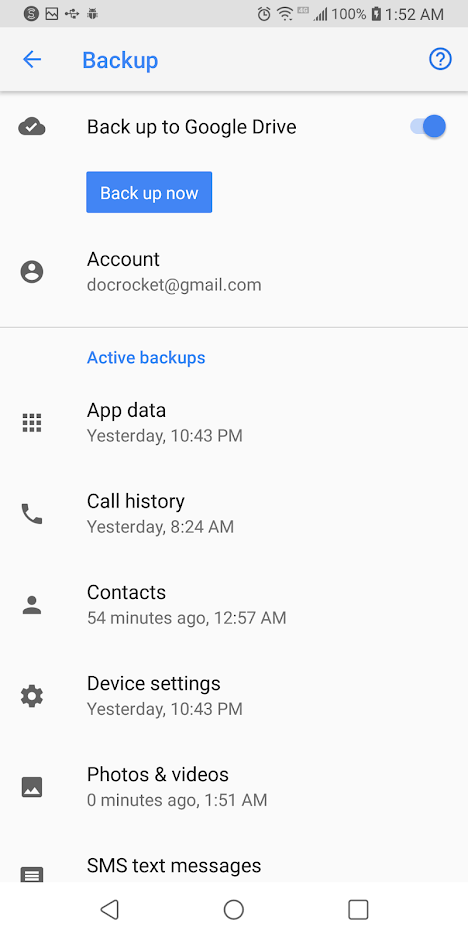
Probably the best combination of things to do does require you plan ahead, and set up a backup of your phone's data to the Google Cloud. This way, even if you have to reset the phone for whatever reason, a reasonably current set of your phone's data will be available, intact, and ready to get your phone back into action. I will walk you through how to set this up. You will need a Google account for this.

To set up backup, follow these steps.

  1. Go to Settings on your phone.
  2. Select System->Backup.
  3. Select Google backup.
  4. Select "Backup Now"

Your phone will now copy the critical data to your Google account.

Restoring from backup is simple. After you reset your phone and attach your Google account to the phone again, it will automatically restore your data from backup. Running a backup takes only a few minutes on a WiFi connection, or even less if you keep your phone regularly backed up – get into the habit of setting off a backup every night when you go to bed and you will always have a near-realtime backup of your phone.

(Want to backup more than just your phone? You can with one of these speedy 4-TB portable hard drives from Toshiba. You can back up all the computers in your household, and still have room for a thousand movies.)

Unlocking Your Phone with Speed

If you aren't having trouble getting into your phone, but you want to make sure your phone is secure while simultaneously unlocking your phone with some serious speed in order to make your day easier, we have some advice. There are plenty of options for unlocking your device, and they all help to make unlocking your phone easier and to prevent a situation where you forget the code for your phone.

Smart Lock

Smart Lock is one of our favorite tools on Android that is unavailable on other platforms. It makes it easy to make sure your phone is always secure, while simultaneously working to stay out of your way when you want access to your device. Basically, Smart Lock offers Android users several ways to unlock their phones when they're using it, while keeping it locked when it's not near them. To turn on smart lock, you'll need to open up your settings menu on your Android device and head into the Security submenu. Under "Device Security," you'll find an option for Smart Lock. Type in your passcode or password to enter Smart Lock, and you'll be greeted with (as of writing) five unique options for unlocking your phone. Let's break each of these down:

  • On-body detection: This setting allows you to unlock your device once before disabling the lock for as long as the phone is in your hand or on your person. Using your smartphone's array of sensors, the device tracks when your device is in use, so you can turn the display off but keep the phone unlocked while it's in your hand. When your phone realizes that it's been set down, your phone will automatically re-lock, requiring a password. This isn't the most secure method Smart Lock offers, but it is pretty cool.

  • Trusted places: Sure, it's one thing to keep your phone locked when you're out on the town, but what about when you're sitting in your apartment watching Netflix and you just want to be able to use your phone without constantly worrying about your password? Trusted places works to use the GPS in your phone to detect that you're in a secure location of your choosing, and automatically keeps your phone unlocked for you. As soon as you leave your location, your phone relocks, keeping things safe and secure for you and your device.

  • Trusted devices: This might be the best of the five Smart Lock options, because it's ideal for keeping your devices safe when you're nearby and keeping your phone locked when you've left. Do you own a smartwatch, a fitness tracker, a set of wireless headphones, or any other device that syncs over Bluetooth? Trusted devices might be the option for you, allowing you to keep your phone unlocked when your phone is paired with your gadgets. Smartwatches and fitness trackers are ideal for this, but it also helps you keep your phone unlocked when driving in your Bluetooth-equipped car, when running with Bluetooth headphones, or when paired with a set of Bluetooth speakers.

  • Trusted face: Plenty of phones have had a face unlock feature, though none of them are quite as secure as the FaceID method on the iPhone X. Still, if you want, you can enable Trusted Face on your device in order to allow your camera to automatically unlock your phone when it recognizes you. However, Trusted Faces is much more easily fooled than the above methods, especially since a photo of you—or even a lookalike—could unlock your phone without having to use any security. Use this one with caution.

  • Voice Match: Voice Match is a bit different than the other options on this list, because largely speaking, it's used to activate Google Assistant more than unlock your device. Here's the deal: turning on Voice Match allows you to access your Google Assistant every time you say "OK Google," even while the screen is off. Once you've enabled that ption, you have a second choice: "Unlock with Voice Match," which allows you to automatically unlock your phone when the sound of your voice saying "OK Google" matches the saved voice model on your device.
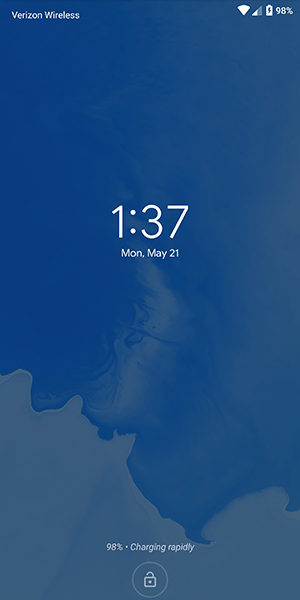
You can enable just one or all five of these, so don't worry if you like the idea of Trusted Devices but don't want to use On-Body Detection. If Smart Lock makes you feel like you can't properly keep your smartphone secured while enabling these settings, you don't need to worry. Every Android smartphone with Smart Lock enabled has the ability to lock the device manually, requiring a passcode or fingerprint in order to use the device properly. At the bottom of your lock screen is a small lock icon that allows you the choice of manually locking your phone. How you use it is actually a little different depending on your device; for example, Samsung devices have you press the icon to lock the app, but the Pixel phones have you press and hold the icon.

Once you've done this, your phone will give you a small notification alerting you that your device has been manually locked, and that the device will stay locked until you're ready to manually unlock with either your fingerprint (if you've turned this on) or your passcode. Manually locking your phone disables all smart locks, so even if you turn on a trusted Bluetooth device, you'll have to either input your passcode or password, or use your fingerprint to unlock the device if you have biometric security enabled. We'll talk more about fingerprints in the section below, and more specifically, how you can keep your biometric data from being used against you on upcoming versions of Android.

Smart Lock is one of those features that seems like a no-brainer, since it's so damn easy to setup and use to your benefit. That said, using Smart Lock obviously raises security concerns overall, since it does keep your phone unlocked more often. You'll want to play around with Smart Lock to find the right combination of security and ease of use for you. Maybe that means unlocking the device when it's attached to your car's Bluetooth and when you're at home, but keeping it secured at work and leaving on-body detection disabled. Whatever the right combination is for you will likely be a personal decision, but with five different modes of Smart Lock available, you have plenty of options and combinations to choose from.

Fingerprints

Almost every Android device in 2018 has a fingerprint sensor equipped on the body of the device, allowing you to easily access your content without having to go through the hassle of entering your passcode every time you use your phone. Fingerprints aren't a perfect unlocking method, but they're fast, secure, and can be equipped with up to four fingerprint entries on most phones. If you aren't using the fingerprint sensor on your device, you should enable it if only to create a backup option. Even if you prefer to unlock your phone by using an unlock method like a PIN, pattern, or password, fingerprints are perfect if you're ever in danger of accidentally locking the device without knowing the proper password.

If you aren't one to use fingerprints to unlock your phone, one step you could take to ensure you never forget your passcode is set the fingerprint on your phone to unlock with a finger that isn't your thumb or index finger. For example, try using your pinky finger or your ring finger as a way to program a fingerprint without making it obvious. You'll always have the option to use your fingerprint as a backup if you forget your code, but otherwise, you'll be good to go when it comes to always having a way to unlock your phone. You could also try using the fingerprint of someone you intensely trust, like a partner or a child, if only to keep a backup that doesn't happen to be with you all the time. This is especially good if you're worried about being forced to unlock your phone by law enforcement, a pressing matter that is becoming more prevalent all the time.
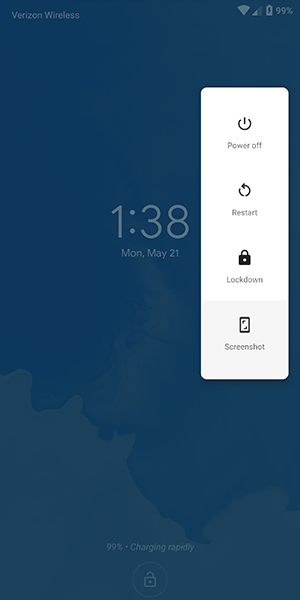
Finally, if you're still worried about logging your fingerprints on your Android device due to security concerns, the upcoming release of Android P has a security feature built-in that allows you to quickly disable fingerprint scanning if you find yourself at risk of being forced to unlock your device. Called "lockdown" in the settings menu, the option allows you to immediately disable both fingerprints and Smart Lock, just by using the option that appears within the power menu on the lock screen. It only disables those features for one lock, but if you're in a place where you're worried your biometric or smartwatch lock features might be used against you, it's a great option to feel more secure.

Notes and Reminders

If you're the type of person who likes to use a complex password on their phone and balks at the idea of using any of the smart unlock features we highlighted above, you might want to consider using the lock screen text display as a way to leave yourself helpful notes and tips to make remembering your password that much easier. Every Android device on the market today has support for placing a message on the lock screen, and you can display some pretty long messages. While most people use this as a way to label their phone (the example in Android is "Joe's Android"), you can also use it to set what amounts to old password hints from Windows and other desktop operating systems.

So, for example, if you've set your password as the name and birthdate of your daughter (ie., "elizabeth1217"), you could set the reminder on your lock screen as "ebbirth", for "elizabeth1217." This can be done for any password, even if it's a random phrase. "Candy90erring60Blinders," for example, could be hinted at on your lock screen with "Reese's, Jewelry, Sunlight." You'll still have to work to remember the numbers and the correct words that match up with the other content, but it can go a long way in helping you to remember what your password is without giving it away. Again, this is totally optional, a way for users to remember their long passwords without having to deal with giving it away or writing it down.

Password Managers

This final tip is for those among us who have a reputation for forgetting passwords and passcodes. If you're always worried about losing your password to your phone and getting locked out, you might want to try using a password manager like Lastpass or 1Password, which allows you to save all your passwords in one place with a single unlock, typically requiring a fairly long phrase in order to gain access to your passcodes. We recommend Lastpass for password manager beginners, because it's free and works with all your devices out of the box. We recommend writing the passcode down somewhere safe and secure in your house, then saving your phone's password inside of Lastpass for safekeeping. It might seem like an odd choice, and certainly won't speed up the unlocking process if you do manage to forget your password, but it's always good to have a backup unlock method to keep your phone's data safe.

***

Losing access to your phone is a nightmare. It's where all of your personal data, from bank account information to photos of your family and friends, lives and is kept safe. Being locked out of your data can feel like the end of the world, but luckily, it doesn't have to be. Whether you're worried about locking yourself of your account, or you've recently updated your phone's password and want to make sure you don't lose it, there are plenty of options to ensure you don't lose access. And even if you have, you aren't completely out of luck, thanks to the various options that exist for getting back into your account.

If you're looking for a way to unlock your phone faster, there's all sorts of opportunities to make sure your Android device is ready for you to login without having to enter your password every time. Biometric security has become fairly commonplace in the mobile arena, and likewise, Smart Lock on Android has made it easy to keep your device secure when it needs to be and unlocked when it doesn't. Overall, the security options on Android have become so plentiful that there's no reason not to keep some kind of security on your Android device. Just make sure you remember the password before you save the account information.

@EVERYTHING NT

Continue reading
  1. Pentest Linux
  2. Pentest Training
  3. Pentest News
  4. Hacking Bluetooth
  5. Pentest Methodology
  6. Hacker Prank